“(SKU:RB-05L007)LCD4884液晶摇杆扩展板”的版本间的差异
来自ALSROBOT WiKi
(以“<br/> 右 ==概述== :2012最新推出的LCD4884 LCD Joystick Shield v2.0 LCD4884液晶屏扩展板是哈尔滨奥松机器人科...”为内容创建页面) |
(→例子程序) |
||
| (未显示3个用户的9个中间版本) | |||
| 第1行: | 第1行: | ||
<br/> | <br/> | ||
[[文件:faef1.jpg|500px|有框|右]] | [[文件:faef1.jpg|500px|有框|右]] | ||
| − | + | ==产品概述== | |
| − | == | + | 最新推出的LCD4884 LCD Joystick Shield v2.0 LCD4884液晶屏扩展板是哈尔滨奥松机器人科技有限公司研发的一款黑白屏液晶扩展板。此扩展板采用Nokia 5110液晶屏为显示器件。SPI接口,最大限度的节省I/O资源。特别添加五向摇杆,方便实现搭建人机互动接口,剩余的模拟与数字接口全部用插针引出,便于安装其它传感器与模块。本品适用于各种开发板和控制器,例如:Arduino控制器、STC单片机、AVR单片机等。 |
| − | + | ||
==规格参数== | ==规格参数== | ||
# 产品名称:LCD4884液晶摇杆扩展板 | # 产品名称:LCD4884液晶摇杆扩展板 | ||
| 第18行: | 第17行: | ||
# 选配配件:3PIN传感器连接线、Arduino 328控制器等 | # 选配配件:3PIN传感器连接线、Arduino 328控制器等 | ||
# 板载资源: | # 板载资源: | ||
| − | + | * 数字接口:8个 | |
| − | + | * 模拟输入借口:5个 | |
| − | + | * 48×84液晶:1个 | |
| − | + | * 无向摇杆按键:1个 | |
| − | + | * 系统复位按键:1个 | |
==使用方法== | ==使用方法== | ||
| − | + | ===使用硬件=== | |
| − | ==LCD4884 Joystick | + | * Carduino UNO 控制器 * 1个 |
| − | : | + | * LCD4884 Joystick Shield ×1 |
| − | + | * USB数据通信线×1 | |
| − | + | ===例子程序=== | |
| − | + | 程序上传前需要先下载链接:https://pan.baidu.com/s/1rZRC6a2eQGpZs_oCbAPEuw?pwd=n7yp | |
| − | : | + | 提取码:n7yp LCD4884 程序使用到的库文件,将它放到Arduino安装目录下的libraries文件夹下<br/> |
| − | : | + | <pre style='color:blue'> |
| − | # | + | /* YourDuinoStarter Example: LCD SHIELD with 'Joystick' button |
| − | + | - WHAT IT DOES Displays on LCD4884, reads button | |
| − | + | - SEE the comments after "//" on each line below | |
| − | + | - CONNECTIONS: | |
| − | + | - LCD 4884 Shield has all connections | |
| + | - | ||
| + | NOTE: Start Serial Monitor to see switch voltage values | ||
| + | - V1.00 02/08/2016 | ||
| + | Questions: terry@yourduino.com */ | ||
| + | |||
| + | /*-----( Import needed libraries )-----*/ | ||
| + | #include <LCD4884.h> // UPDATED version 2/16 Yourduino | ||
| + | /*-----( Declare Constants and Pin Numbers )-----*/ | ||
| + | #define LCD_BACKLIGHT_PIN 7 | ||
| + | |||
| + | /*-----( Declare objects )-----*/ | ||
| + | //None: Included in library | ||
| + | /*-----( Declare Variables )-----*/ | ||
| + | int displayDelay = 1000; | ||
| + | int switchDelay = 100; // Switch scanning delay | ||
| + | int switchVoltage ; // From Analog read of the button resistors | ||
| + | |||
| + | void setup() /****** SETUP: RUNS ONCE ******/ | ||
| + | { | ||
| + | Serial.begin(115200); | ||
| + | pinMode(LCD_BACKLIGHT_PIN, OUTPUT); | ||
| + | lcd.LCD_init(); // creates instance of LCD | ||
| + | lcd.LCD_clear(); // blanks the display | ||
| + | for (int a = 0; a < 5; a++) | ||
| + | { | ||
| + | digitalWrite(LCD_BACKLIGHT_PIN, LOW); | ||
| + | delay(300); | ||
| + | digitalWrite(LCD_BACKLIGHT_PIN, HIGH); | ||
| + | delay(300); | ||
| + | } | ||
| + | for (int a = 0; a < 6; a++) | ||
| + | { | ||
| + | lcd.LCD_write_string(0, a, "01234567980123", MENU_NORMAL); // ignore MENU_NORMAL for now | ||
| + | delay(displayDelay); | ||
| + | } | ||
| + | delay(displayDelay); | ||
| + | lcd.LCD_clear(); // blanks the display | ||
| + | delay(500); | ||
| + | // Show the BIG characters (0..9, + - only) | ||
| + | lcd.LCD_write_string_big(0, 0, "012345", MENU_NORMAL); | ||
| + | lcd.LCD_write_string_big(0, 3, "-+-+-+", MENU_NORMAL); | ||
| + | delay(1000); | ||
| + | lcd.LCD_clear(); // now read the joystick using analogRead(0 | ||
| + | |||
| + | }//--(end setup )--- | ||
| + | |||
| + | |||
| + | void loop() /****** LOOP: RUNS CONSTANTLY ******/ | ||
| + | { | ||
| + | lcd.LCD_write_string(1, 1, "PUSH A BUTTON", MENU_NORMAL); | ||
| + | switchVoltage = analogRead(0); | ||
| + | Serial.print("Switch analog value = "); | ||
| + | Serial.println(switchDelay); | ||
| + | |||
| + | if (switchVoltage == 0) | ||
| + | { | ||
| + | lcd.LCD_write_string(2, 2, "LEFT ", MENU_NORMAL); | ||
| + | } | ||
| + | else if (switchVoltage > 0 && switchVoltage < 180) | ||
| + | { | ||
| + | lcd.LCD_write_string(2, 2, "PUSH IN", MENU_NORMAL); | ||
| + | delay(switchDelay); | ||
| + | } | ||
| + | else if (switchVoltage > 180 && switchVoltage < 400) | ||
| + | { | ||
| + | lcd.LCD_write_string(2, 2, "DOWN ", MENU_NORMAL); | ||
| + | delay(switchDelay); | ||
| + | } | ||
| + | else if (switchVoltage > 400 && switchVoltage < 600) | ||
| + | { | ||
| + | lcd.LCD_write_string(2, 2, "RIGHT", MENU_NORMAL); | ||
| + | delay(switchDelay); | ||
| + | } | ||
| + | else if (switchVoltage > 600 && switchVoltage < 800) | ||
| + | { | ||
| + | lcd.LCD_write_string(2, 2, "UP ", MENU_NORMAL); | ||
| + | delay(switchDelay); | ||
| + | } | ||
| + | else if (switchVoltage > 800) { | ||
| + | lcd.LCD_write_string(2, 2, "NONE ", MENU_NORMAL); | ||
| + | delay(switchDelay); | ||
| + | } | ||
| + | |||
| + | } //--(end main loop )--- | ||
| + | |||
| + | /*-----( Declare User-written Functions )-----*/ | ||
| + | //NONE | ||
| + | |||
| + | //*********( THE END )*********** | ||
| + | </pre> | ||
| + | |||
| + | ===程序效果=== | ||
[[文件:faef2.jpg|500px|有框|居中]] | [[文件:faef2.jpg|500px|有框|居中]] | ||
[[文件:faef3.jpg|500px|有框|居中]] | [[文件:faef3.jpg|500px|有框|居中]] | ||
[[文件:faef4.jpg|500px|有框|居中]] | [[文件:faef4.jpg|500px|有框|居中]] | ||
[[文件:faef5.jpg|500px|有框|居中]] | [[文件:faef5.jpg|500px|有框|居中]] | ||
| + | ==视频演示== | ||
| + | [[File:LCD4884 01.png|400px|左|link=http://v.youku.com/v_show/id_XNDU0MzE5NjIw.html?from=y1.7-2]] | ||
| + | <br/> | ||
| + | <br/> | ||
| + | <br/> | ||
| + | <br/> | ||
| + | <br/> | ||
| + | <br/> | ||
| + | <br/> | ||
| + | <br/> | ||
| + | <br/> | ||
| + | <br/> | ||
| + | <br/> | ||
| + | <br/> | ||
| + | <br/> | ||
| + | <br/> | ||
| + | <br/> | ||
| + | <br/> | ||
| + | <br/> | ||
| + | ==产品相关推荐== | ||
| + | [[文件:erweima.png|230px|无框|右]] | ||
| + | ===购买地址=== | ||
| + | [http://www.alsrobot.cn/goods-44.html LCD4884液晶摇杆扩展板] | ||
| + | ===周边产品推荐=== | ||
| + | [http://www.alsrobot.cn/goods-126.html 1602液晶显示器 蓝白屏 ] | ||
| + | <br/> | ||
| + | [http://www.alsrobot.cn/goods-129.html Arduino IIC/I2C LCD1602 字符液晶显示器] | ||
| + | ===相关问题解答=== | ||
| + | [http://www.makerspace.cn/forum.php?mod=viewthread&tid=4009&highlight=lcd4884 LCD4884液晶摇杆扩展板显示应用]<br/> | ||
| + | [http://www.makerspace.cn/forum.php?mod=viewthread&tid=3250&highlight=lcd4884 关于arduino的LCD4884的使用] | ||
| + | ===相关学习资料=== | ||
| + | [http://v.youku.com/v_show/id_XNDU0MzE5NjIw.html 操作视频]<br/> | ||
| + | [http://www.makerspace.cn/portal.php 奥松机器人技术论坛] | ||
2023年11月18日 (六) 13:27的最后版本

目录 |
产品概述
最新推出的LCD4884 LCD Joystick Shield v2.0 LCD4884液晶屏扩展板是哈尔滨奥松机器人科技有限公司研发的一款黑白屏液晶扩展板。此扩展板采用Nokia 5110液晶屏为显示器件。SPI接口,最大限度的节省I/O资源。特别添加五向摇杆,方便实现搭建人机互动接口,剩余的模拟与数字接口全部用插针引出,便于安装其它传感器与模块。本品适用于各种开发板和控制器,例如:Arduino控制器、STC单片机、AVR单片机等。
规格参数
- 产品名称:LCD4884液晶摇杆扩展板
- 产品货号:RB-05L007
- 工作电压:DC5V
- 产品类型:Arduino扩展板
- 制作工艺:FR4双面喷锡
- 人性化设计:具有可人机互动接口“五项摇杆”
- 工作温度:10℃-30℃
- 重量:28g
- 产品尺寸:69.47mm x 53.34mm x 18mm
- 发货清单:LCD4884液晶摇杆扩展板×1
- 包装方式:静电袋密封
- 选配配件:3PIN传感器连接线、Arduino 328控制器等
- 板载资源:
- 数字接口:8个
- 模拟输入借口:5个
- 48×84液晶:1个
- 无向摇杆按键:1个
- 系统复位按键:1个
使用方法
使用硬件
- Carduino UNO 控制器 * 1个
- LCD4884 Joystick Shield ×1
- USB数据通信线×1
例子程序
程序上传前需要先下载链接:https://pan.baidu.com/s/1rZRC6a2eQGpZs_oCbAPEuw?pwd=n7yp
提取码:n7yp LCD4884 程序使用到的库文件,将它放到Arduino安装目录下的libraries文件夹下
/* YourDuinoStarter Example: LCD SHIELD with 'Joystick' button
 - WHAT IT DOES Displays on LCD4884, reads button
 - SEE the comments after "//" on each line below
 - CONNECTIONS:
   - LCD 4884 Shield has all connections
   -
   NOTE: Start Serial Monitor to see switch voltage values
 - V1.00 02/08/2016
   Questions: terry@yourduino.com */

/*-----( Import needed libraries )-----*/
#include <LCD4884.h>  // UPDATED version 2/16 Yourduino
/*-----( Declare Constants and Pin Numbers )-----*/
#define LCD_BACKLIGHT_PIN  7

/*-----( Declare objects )-----*/
//None: Included in library
/*-----( Declare Variables )-----*/
int displayDelay = 1000;
int switchDelay  = 100;  // Switch scanning delay
int switchVoltage ;   // From Analog read of the button resistors

void setup()   /****** SETUP: RUNS ONCE ******/
{
  Serial.begin(115200);
  pinMode(LCD_BACKLIGHT_PIN, OUTPUT);
  lcd.LCD_init(); // creates instance of LCD
  lcd.LCD_clear(); // blanks the display
  for (int a = 0; a < 5; a++)
  {
    digitalWrite(LCD_BACKLIGHT_PIN, LOW);
    delay(300);
    digitalWrite(LCD_BACKLIGHT_PIN, HIGH);
    delay(300);
  }
  for (int a = 0; a < 6; a++)
  {
    lcd.LCD_write_string(0, a, "01234567980123", MENU_NORMAL); // ignore MENU_NORMAL for now
    delay(displayDelay);
  }
  delay(displayDelay);
  lcd.LCD_clear();   // blanks the display
  delay(500);
  // Show the BIG characters (0..9, + - only)
  lcd.LCD_write_string_big(0, 0, "012345", MENU_NORMAL);
  lcd.LCD_write_string_big(0, 3, "-+-+-+", MENU_NORMAL);
  delay(1000);
  lcd.LCD_clear();  // now  read the joystick using analogRead(0

}//--(end setup )---


void loop()   /****** LOOP: RUNS CONSTANTLY ******/
{
  lcd.LCD_write_string(1, 1, "PUSH A BUTTON", MENU_NORMAL);
  switchVoltage = analogRead(0);
  Serial.print("Switch analog value = ");
  Serial.println(switchDelay);

  if (switchVoltage == 0)
  {
    lcd.LCD_write_string(2, 2, "LEFT ", MENU_NORMAL);
  }
  else if (switchVoltage > 0 && switchVoltage < 180)
  {
    lcd.LCD_write_string(2, 2, "PUSH IN", MENU_NORMAL);
    delay(switchDelay);
  }
  else if (switchVoltage > 180 && switchVoltage < 400)
  {
    lcd.LCD_write_string(2, 2, "DOWN ", MENU_NORMAL);
    delay(switchDelay);
  }
  else if (switchVoltage > 400 && switchVoltage < 600)
  {
    lcd.LCD_write_string(2, 2, "RIGHT", MENU_NORMAL);
    delay(switchDelay);
  }
  else if (switchVoltage > 600 && switchVoltage < 800)
  {
    lcd.LCD_write_string(2, 2, "UP   ", MENU_NORMAL);
    delay(switchDelay);
  }
  else if (switchVoltage > 800)              {
    lcd.LCD_write_string(2, 2, "NONE    ", MENU_NORMAL);
    delay(switchDelay);
  }

}  //--(end main loop )---

/*-----( Declare User-written Functions )-----*/
//NONE

//*********( THE END )***********
程序效果


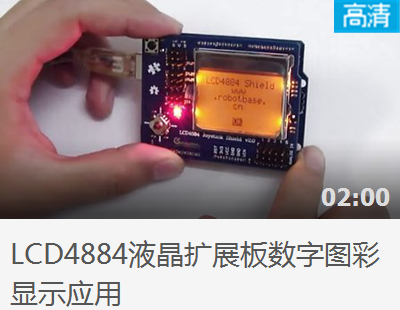
视频演示
产品相关推荐

购买地址
周边产品推荐
1602液晶显示器 蓝白屏
Arduino IIC/I2C LCD1602 字符液晶显示器
相关问题解答
LCD4884液晶摇杆扩展板显示应用
关于arduino的LCD4884的使用
